


Audience: Federal Staff and Federal Contractors
Purpose
This Quick Sheet instructs Grantor users of the automatic notifications enabled in the GrantSolutions Grants Management Services (GMM) on how to turn them on or off, when they are sent, which GrantSolutions roles receive them, and a sample email text.
Note: Notifications may vary as determined by the Partner agency.
Manage Grantor Notifications
If a user is assigned to a grant, the GMM sends essential email notifications when the following actions occur:
- A correspondence note is added
- An action is ready to be performed
- An action is complete
Modify Notification Preference
Although all notifications are turned on by default when a user first accesses the system, the user can modify notification preferences.
Note: Please follow your Federal Agency’s process on system email notifications.
- Log into the GrantSolutions GMM (www.grantsolutions.gov). For Login information and instruction, please view the GrantSolutions Login Quick Sheet.
- To access the Notification Preferences screen, follow either instruction below:
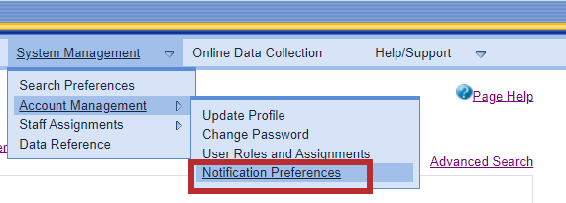
- From the classic menu bar, click the System Management drop-down, then click the Account Management sub menu and click the Notification Preferences option.
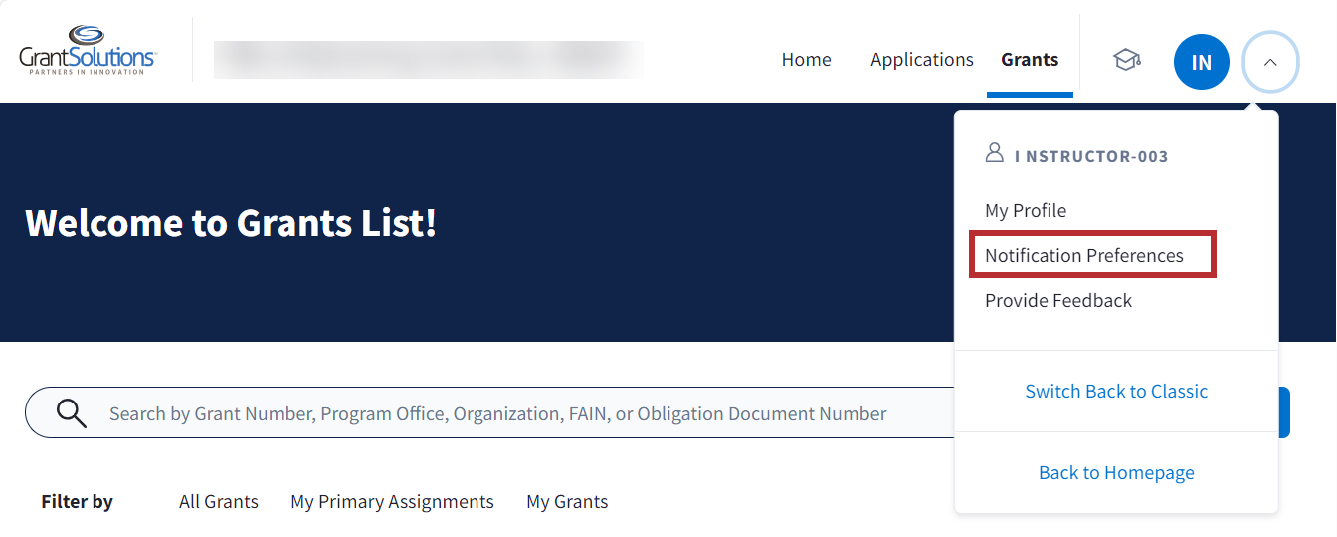
- From the new experience “Grants List” screen, click the Initials icon drop-down and select the Notification Preferences option.
- From the classic menu bar, click the System Management drop-down, then click the Account Management sub menu and click the Notification Preferences option.
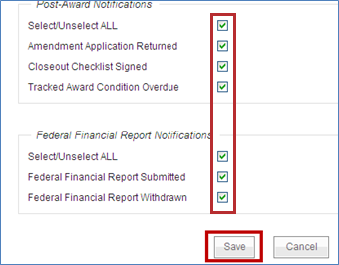
The “Notification Preferences” screen appears. Notification actions are grouped by Global, Award, Pre-Award, Post-Award, and Federal Financial Report (FFR).
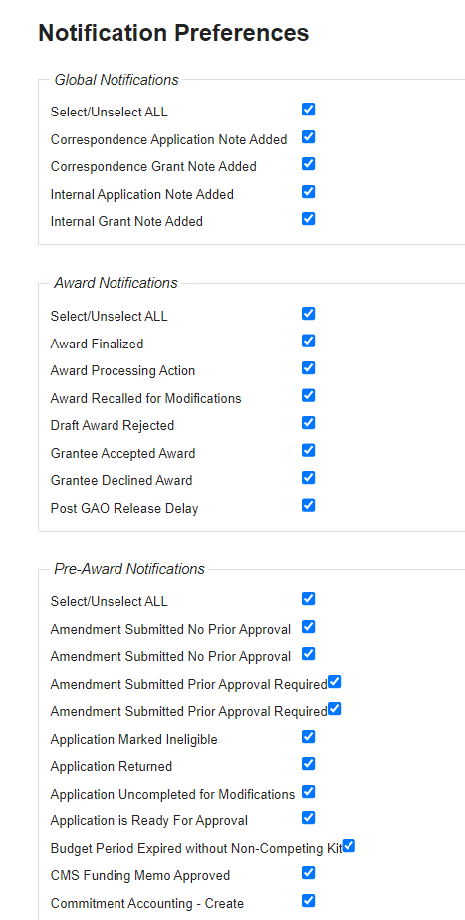
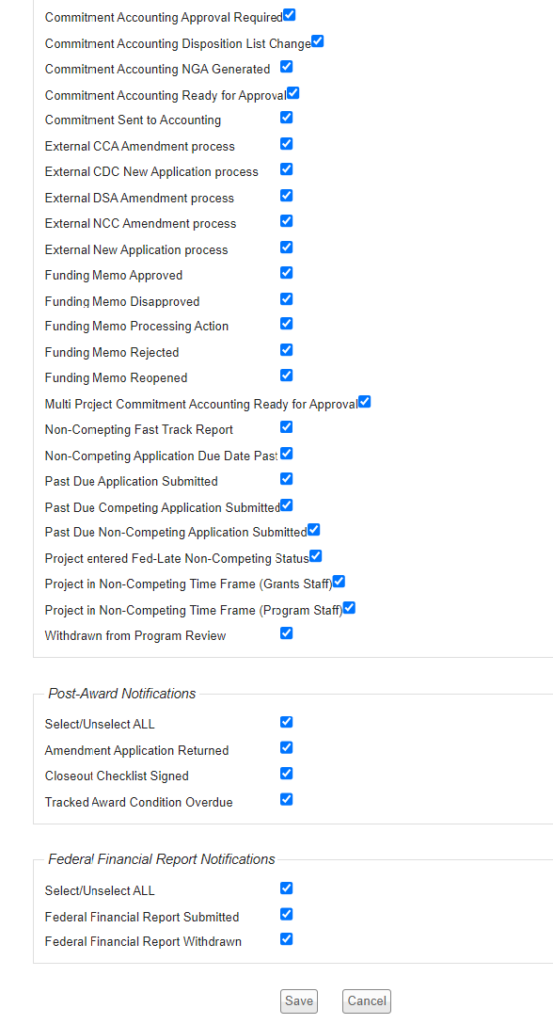
- By default, all notification checkboxes are selected. To turn off notifications, deselect the appropriate checkboxes and click the Save button.
Note: It is best practice to leave all notifications turned on in the GrantSolutions GMM until determining which notifications are necessary.
Notification Details
Understanding the type of notification, the roles that receive it, and the email text is important for determining which notifications are necessary and which can be turned off.
The GMM Grantor roles are as follows:
- Program Office
- Administrative Director (AD)
- Program Data Analyst (DA)
- Program Office Director (OD)
- Program Authorizing Official (AO)
- Deputy Authorizing Official (DAO)
- Program Budget Officer (PBO)
- Program Coordinator (PC)
- Program Officer (PO)
- Program Support Staff (PSS)
- Research Director (RD)
- Grants Office
- Grants Management Officer (GMO)
- Grants Quality Control (GQC)
- Grants Management Specialist (GMS)
- Grants Support Staff (GSS)
- Financial Office
- Financial Management Officer (FMO)
Global Notifications
The table below contains the list of Global notifications, the roles that receive the messages, and the email text:
| Notification Action | Role Receiving Notification | Email Text |
|---|---|---|
| Correspondence Application Note Added |
Awarded Grant: All Grantor staff (Program and Grants Staff) with an active grant assignment Application (not an Awarded Grant): All Grantor staff (Program and Grants Staff) assigned to the Grant Service Office and Program Service Office | Subject: Text: |
| Correspondence Grant Note Added | All Grantor staff (Program and Grant) with an active assignment to the Grant | Subject: Text: |
Award Notifications
The table below contains the list of Award notifications, the roles that receive the messages, and the email text:
| Notification Action | Role Receiving Notification | Email Text |
|---|---|---|
| Award Finalized | Grants Staff: GMO, GMS, GQC Program Staff: PO, PBO, FMO, PC, OD, AD, DAO, AO | Subject: The Grant for <Grantee Org Name>(<grant#>) has been awarded. Text: The Grant/Cooperative Agreement for Grant# xxx has been awarded and released. To view the award in GrantSolutions, please click the grant number below or click the following URL [Link to Grant]. If you do not have a Grantee account, please complete the Grantee Account Registration form and submit it to the Help Desk. After verification from the Grants Service Office associated with this award, the Help Desk will inform you of your new account information. Please follow the instructions provided in the form. Organization: <Grantee/Applicant Org Name> Grant#: Application#: Application Type: Program Office: Grant Program: Project Title: Agency: |
| Award Processing Action | Staff with an active Grant Assignment receive the following notifications when the award has transitioned to one of the below statuses on the Award Processing screen: In Review: GMO and GQC Ready for Budget Officer Review: PBO Ready for Program Officer Approval: PO Ready for Program Manager Approval: PC Ready for Program Director Approval: OD Ready for Administrative Review: AD Ready for Authorization Review: DAO Ready for Final Approval: AO Ready to Certify: FMO Ready to Issue: GMO, GMS, GQC Notification Delay: GMO, GMS, GQC, PO, PBO, FMO, PC, OD, AD, DAO, AO Ready For AO Release: AO Sent to Accounting: GMO, GMS, GQC Accounting Rejection: GMO, GMS, GQC Pre-Complete Delay: GMO, GMS, GQC, PO, PBO, FMO, PC, OD, AD, DAO, AO Completed: GMO, GMS, GQC Pre-Complete Delay: GMO, GMS, GQC, PO PBO, FMO, PC, OD, AD, DAO, AO Reject Action: GMO, GMS, GQC Recall Action: GMO, GMS, GQC Accept Action: GMO, GMS, GQC Decline Action: GMO, GMS, GQC | Subject: Draft (Notice of Grant Award) NGA for <Grantee Org Name><grant#> has been forwarded for your review. Text: The draft NGA for Grant# has been forwarded for your review. Award Workflow Status: Organization: Draft Grant#: Application#: Amendment Type: (Amendment Type) if application type is amendment Program Office: Grant Program: To review this action in GrantSolutions, please click the grant number above or use the following URL [Link to Grant]. |
| Award Recalled for Modifications | Assigned GMO, GMS, GQC | Subject: Draft NGA for <Grantee Org Name><grant#> has been recalled. Text: The draft NGA for Grant# has been recalled by the Grants Servicing Office for modification. Organization: Draft Grant#: Application#: Application Type: Program Office: Grant Program: To review this action in GrantSolutions, please click the grant number above or use the following URL [Link to Grant]. |
| Draft Award Rejected | GMO, GMS, GQC | Subject: Draft NGA for <Grantee Org Name><grant#>has been rejected. Text: The draft NGA for Grant# has been rejected and requires your review. Organization: Draft Grant#: Application#: Application Type: Supplement/Amendment: Amendment Type: Program Office: Grant Program: To review this action in GrantSolutions, please click the grant number above or use the following URL [Link to Grant]. |
| Grantee Accepted Award | Assigned GMO, GMS, GQC | Subject: The NGA for <Grantee Org Name><grant#> has been accepted by the Grantee. Text: The NGA for Grant# has been accepted by the Grantee. Organization: Draft Grant#: Application#: Application Type: Program Office: Grant Program: To review this action in GrantSolutions, please click the grant number above or use the following URL [Link to Grant]. |
| Grantee Declined Award | Assigned GMO, GMS, GQC | Subject: The NGA for <Grantee Org Name><grant#> has been declined by the Grantee. Text: The NGA for Grant# has been declined by the Grantee. Organization: Draft Grant#: <FULL grant# including SY and Revision#> Application#: Application Type: New/Competing Continuation/Directed Supplement/Amendment BEGIN Amendment Type: (Amendment Type) if application type is amendment END Program Office: Grant Program: To review this action in GrantSolutions, please click the grant number above or use the following URL. |
Pre-Award Notifications
The table below contains the list of Pre-Award notifications, the roles that receive the messages, and the email text:
| Notification Action | Role Receiving Notification | Email Text |
|---|---|---|
| Amendment Submitted No Prior Approval | Assigned GMS and Assigned PO/PC/OD | Subject: Text: |
| Amendment Submitted – Prior Approval Required | Assigned GMS and Assigned PO/PC/OD | Subject: Text: |
| Application Marked Ineligible | GMOs assigned to the Grant Program | Subject: Text: |
| Application Returned | GMO, GMS, RD/OD/RPC, PO/PC | Subject: Text: |
| Application Uncompleted for Modifications | GSS, GMS | Subject: Text: |
| Application is Ready for Approval | Roles may vary | Subject: Text: |
| Budget Period Expired without Non-Competing Kit | Assigned GMO, GMS, PO/PC, OD/RPC, RD | Subject: Text: |
| Commitment Accounting – Create (Message sent when an application is Approved on the Application Recommendation screen) | Users can Create, Edit, Delete, and Approve Commitment Accounting. | Subject: Text: |
| Commitment Accounting Approval Required | Users with the ability to Approve Commitment Accounting | Subject: Text: |
| Commitment Accounting Disposition List Change (Message sent when the Decision is changed to Disapproved from Approved on the Application Recommendation screen) | Users with the ability to Approve Commitment Accounting | Subject: Text: |
| Commitment Accounting NGA Generated (Message sent when the NOA is generated but the Commitment is not yet Approved) | Users with the ability to Approve Commitment Accounting | Subject: Text: |
| Commitment Accounting Ready for Approval | Users with the ability to Approve Commitment Accounting | Subject: Text: |
| Commitment Sent to Accounting | Primary project assigned users with these roles: FMO, PBO, GMO, GMS, PO | Subject: Text: |
| Funding Memo Approved (Notification sent when the Funding Memo is approved) | AO, OD, GMO, GMS | Subject: Text: |
| Funding Memo Disapproved | AO, OD, GMO, GMS | Subject: Text: |
| Funding Memo Processing Action (All statuses excluding exceptions, create, reject, approval and disapproval) | The next person in the workflow process | Subject: Text: |
| Funding Memo Rejected | Whoever performed an action since the draft status | Subject: Text: |
| Funding Memo Reopened | Notification is sent to all users who performed a workflow operation since the memo was last in the draft status | Subject: Text: |
| Multi Project Commitment Accounting – Ready for Approval (Commitment Transaction Entered) | Authority with Commitment Accounting Permission to Approve | Subject: Text: Commitment accounting is required for this grant program. To approve the commitment for this application please use the following URL. |
| Non-Competing Application Due Date Past | Assigned GMS, PO/PC | Subject: Text: |
| Past Due Application Submitted (Non-Competing Continuation Electronic Submissions Only) | Assigned GMS, GMO, RD/OD/RPC, PO/PC | Subject: Text: |
| Past Due Competing Application Submitted (Electronic Submissions ONLY) | Assigned GMS, GMO, RD/OD/RPC, PO/PC | Subject: Text: |
| Past Due Non-Competing Application Submitted (Electronic Submissions ONLY) | Assigned GMS, GMO, RD/OD/RPC, PO/PC | Subject: Text: |
| Project entered Fed-Late Non-Competing Status (180 days from Budget Period End date) | Assigned GMO, GMS, PO/PC, RD/OD/RPC | Subject: Text: |
| Project in Non-Competing Time Frame (Grants Staff) (Non-Competing status is ready. Set at 270 days from the Budget Period end date) | Assigned GMO, GMS | Subject: Text: |
| Project in Non-Competing Time Frame (Program Staff) (Non-Competing status is ready. Set at 270 days from the Budget Period end date) | Assigned PO/PC, RD/OD/RPC | Subject: Text: |
Post-Award Notifications
The table below contains the list of Post-Award notifications, the roles that receive the messages, and the email text:
| Notification Action | Role Receiving Notification | Email Text |
|---|---|---|
| Amendment Application Returned | Assigned GMS, RD/OD/RPC, PO/PC | Subject: Text: |
| Closeout Checklist Signed | Authorities that can issue closeout awards or mark grants closed without awards. | Subject: Text: |
| Tracked Award Condition Overdue (When creating a Notice of Award (NOA) component, users can select a checkbox and indicate if a condition is tracked. If so, a due date is required.) | Assigned GMS, GSS, PO/PC | Subject: Text: |
Federal Financial Report Notifications
The table below contains the list of Federal Financial Report notifications, the roles that receive the messages, and the email text:
| Notification Action | Role Receiving Notification | Email Text |
|---|---|---|
| Federal Financial Report Submitted | GMS/GMO | Subject: Text: |
| Federal Financial Report Withdrawn | GMS/GMO | Subject: Text: |